Deduplicating Products in Shopify
Introduction
I am involved in an ERP implementation for an eCommerce company as fractional CTO.
In this role I advise and supervise the technical aspects of the consultancy company in charge of the implementation per se and collaborate closely with the SPOC or Project Manager in the company.
There are plenty of technical challenges in this project but I want to focus this post on a specific one: Catalog Product Deduplication / Normalization.
We need to have a common, normalized and standardized catalog of products across the company.
One moment? Are you saying that an eCommerce company with ~4MM revenue can exist without having a catalog, a list of the products they are selling?
Welcome to the real world. :D
But all good, we have been in worse battles.
The Problem
This eCommerce company has several shops running in Shopify. Each shop acts separately and each shop has specific products but also products shared across different shops.
The company does not have a unique ID to identify a product globally (known as SKU in the domain).
There is no guarantee that a product is named equally in all the shops.
Also the same product in different shops—although the attributes should be the same (vendor, category, variants if they are)—can have slight name variations.
Just generalizing, what in one shop is “category” can be “CATEGORY_1” in another shop or “cat-1”.
So how can we deduplicate the products?
The solution
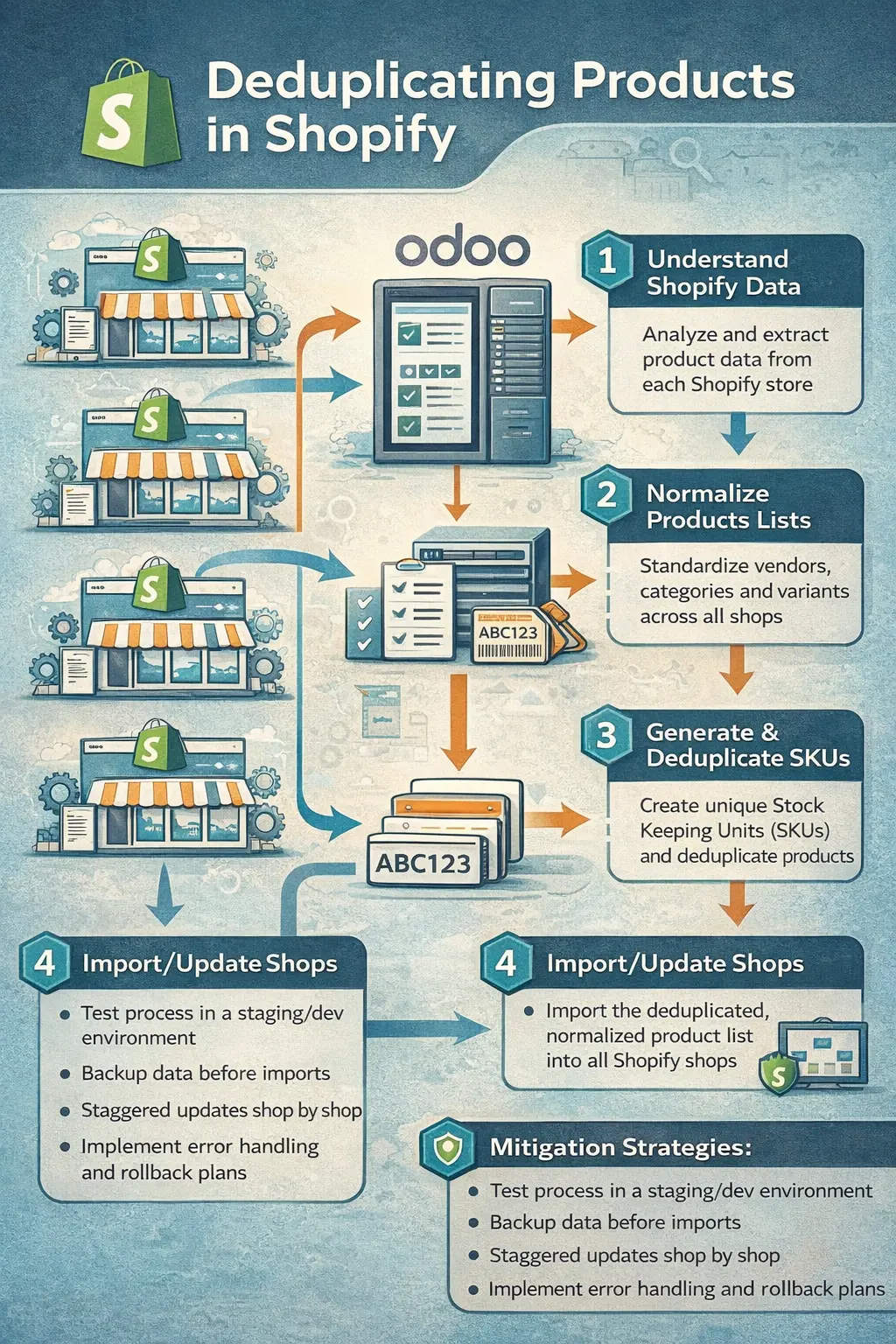
The solution involves the following steps:
Understand the Product Data From Shopify
Create Normalized Product List For each Shop
Generate SKUs
Deduplicate the products list
Import / update the product list for each Shop
Understand the Product Data From Shopify
How product data is stored internally in Shopify.
Shopify is a vast product that acts not only as an eCommerce frontend but as a logistic partner among others. For the sake of simplicity and because it is not needed for this article, we will keep focused on the product information we need.
A product in Shopify is made of:
The product itself and variants
Bundles
Bundles
They need their own section. Bundles will be managed from the ERP we are building.
And this is the flow we’d like to have:
Bash
Odoo (ERP) calculates: Bundle X available = min(A_qty, B_qty, C_qty)
↓
Push Bundle X to Shopify with calculated quantity
↓
Customer buys Bundle X in Shopify
↓
Order syncs to Odoo
↓
Odoo BoM system deducts 1×A, 1×B, 1×C
↓
Recalculate Bundle X availability
↓
Update Shopify with new quantity
But the problem is that now, we have in Shopify “fake bundles” that are not related to the products inside of them.
Those bundles will have to be handled manually in step 2.
Create Normalized Product List For each Shop
Ok, now that we understand how products work in Shopify (and how they relate to Odoo) we do have to normalize the product list.
This at the beginning was worrying me a lot, but we have people in the company with very good domain knowledge so it was easier than thought (of course keeping in mind all the mitigation strategies I will comment on later).
Let’s summarize the problems we face:
Keep uniqueness between handles in Shopify
Vendors, categories and options (variants) are not normalized between shops
Same product can have slightly different vendor, category or variant values (options)
Potential different handles between products and shops
Each product in Shopify has a handle that identifies the product within a shop. This ID is very important because it’s what allows us to link to a product in Shopify and eventually update it.
Vendors, categories and options (variants) are not normalized between shops
This needs some cleanup work.
Extract all vendors, categories and options
Normalize the values
Map the normalized values to the existing ones for each shop
Replace the “wrong” values with the new ones
As a result we should have a file that could be eventually re-imported in Shopify and standardized across shops.
Do we need to find all the categories, options and vendors at once? Or can we do it just shop by shop? Add author/source
Same product can have slightly different vendor, category or variant values (options)
This problem has to be tackled carefully because a bad decision can mark a product in Shop 2 as different than a product in Shop 1 although it was the same.
Visual review would help. Not clear on other mitigation strategies.
Generate SKUs
Once we have a clean file, we can create the SKUs following the structure defined internally. Usually SKU is an ID “with meaning” and the meaning is defined by the warehouse team.
Deduplicate the products (deduplication strategy)
Let’s say we have for Shop 1 a clean product list. We import it in Shop 1 without any issue.
But then we go to Shop 2, and we get a clean product list also… BUT maybe some of the products we have in Shop 2 already exist in Shop 1. What is the strategy to follow here?
The Shop 1 products are already in Odoo and the eCommerce department is managing them from Odoo.
Good to mention that not everything from products will be managed from Odoo and when import happens in Shop 1 first time, we have to have time to work with Marketing/eCommerce to see which fields will be handled by Shopify itself. Add author/source
We have to merge Shop 2 product list with Shop 1 and IF a product in Shop 2 exists in Shop 1, update the Shop 2 list. Strategy: - The attributes of Shop 1 product should overwrite the ones from Shop 2, including the SKU - But not the handle in Shop 2 product list, because the handle is the one that allows us to update the product, remember
This process will have to be done cumulatively. It means that:
Shop 2 is compared against Shop 1 Shop 3 is compared against Shop 1 and Shop 2 Shop 4 is compared against Shop 1 and Shop 2 and Shop 3 and so on
Import / update the product list for each Shop
This is the last step. Once we are sure a list of products is clean, having the proper normalized values, we can just re-import it in Shopify. For that we have to be sure that the handle was not modified.
Also, we should review the report of insert errors and other mitigation strategies I will comment on below.
Mitigation Strategies
As discussed briefly above, everything discussed above is just the happy path. A list of actions and TODOs to apply.
The roadmap has to be taken carefully because we are dealing with applications in production that are the main stream of revenue for the company. We cannot mess up the products and the ongoing company operations.
Therefore the following measures are being taken into consideration:
Do a first test in a staging/dev shop to be sure the re-import works as expected
For the very first shop, do small amounts of product updates
Do the updates staggered shop by shop
Before doing the update of one shop, do a backup of the existing data…
… create a product freeze window:
Export for a shop
Data cleanup and normalization
Re-import
Assign people to do a visual check
Rollback Plan
reimport original non modified export
validate the new scenario with validation scripts
Post-Go-Live: Maintaining Data Quality
Once all shops are migrated, we need to prevent regression:
Data Watcher: Assign owner for maintaining normalized value lists.
New Product Process:
Products from Odoo: Close Shopify access to create Products to people (generate list)
SKU generated by warehouse team before Shopify creation
Adding New Normalized Values
Monitoring. Regular report of product without skus, duplicated